Naxqelvi
Layer Archive
Layer Archive
Couldn't load pickup availability
- Problem Statement
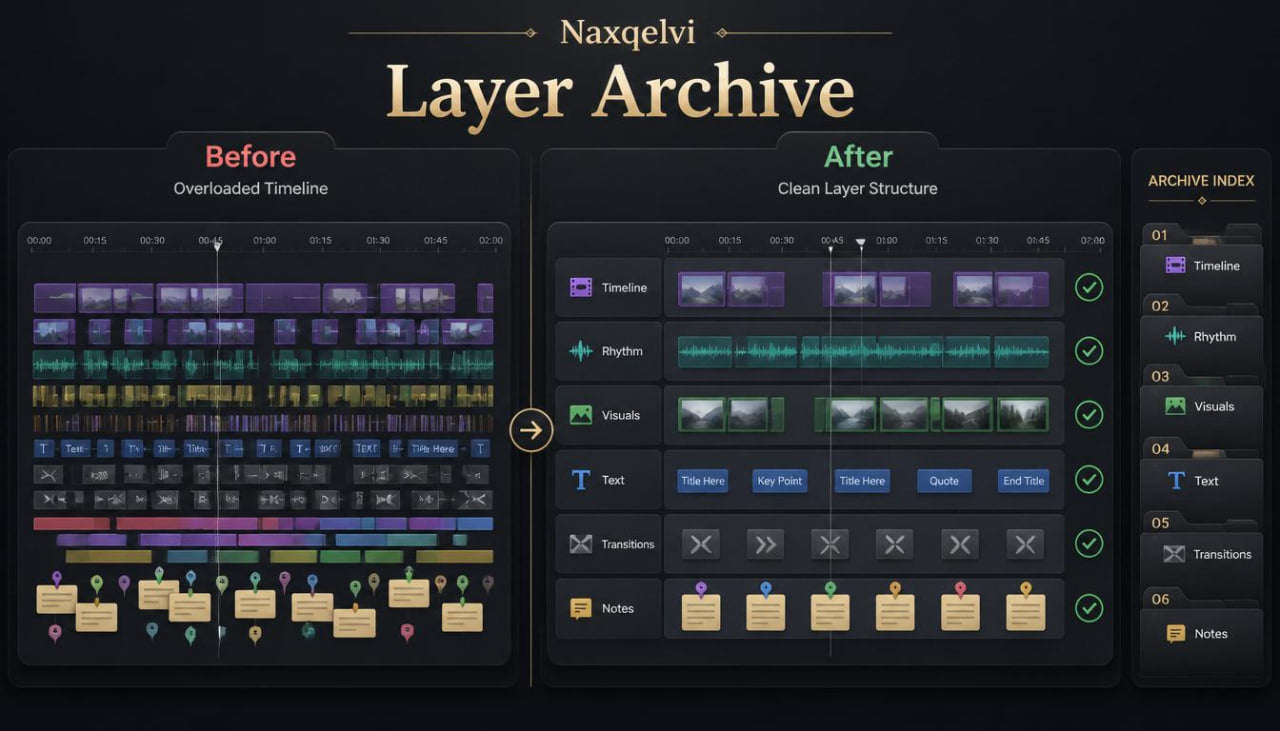
Many learners reach a point where a timeline contains several moving parts, and the project begins to feel difficult to manage. Clips, text elements, transitions, visual tone, pacing notes, and review changes can become mixed together without a clear order. When this happens, it may be hard to understand which part of the edit needs attention first. A learner may adjust timing when the real issue is visual tone, or change a transition when the deeper issue is scene structure. Layer Archive was created to help learners study editing in organized layers, so each part of the timeline can be reviewed with a clearer purpose.
- Solution
Layer Archive gives learners a structured way to separate editing work into practical study layers. The materials explain how to review a project through timeline layers, visual layers, rhythm layers, text layers, transition layers, and revision layers. Each layer is treated as one part of the full edit, helping learners study complex projects without handling everything at once. The tier includes archive-style worksheets, project sorting tables, review prompts, and guided practice tasks. Layer Archive supports a calmer editing routine by helping learners keep notes, decisions, and revisions organized.
- What’s Inside
Layer Archive includes a detailed set of Naxqelvi materials focused on timeline organization and layered review. The tier begins with an orientation module that explains the idea of working in layers. Learners are introduced to a simple method: instead of viewing the timeline as one large task, they can divide it into separate review areas. This creates a cleaner way to study what is happening inside the project.
The first main section focuses on the timeline layer. Learners study the basic order of clips, scene sections, opening movement, middle development, and closing direction. This section explains how the timeline layer acts as the foundation for the entire edit. If the order feels unclear, later visual changes may not solve the deeper issue. Learners are guided to review sequence order before moving into smaller details.
The second section explores the rhythm layer. This part explains how shot length, pauses, movement speed, repeated timing patterns, and quiet moments shape the viewing flow. Learners study how rhythm can be reviewed separately from frame details or visual tone. The materials include comparison prompts where learners describe how the same sequence feels when the rhythm layer changes.
The third section introduces the visual layer. This layer includes subject placement, frame balance, background detail, light mood, contrast, and color direction. Learners study how visual choices can either support the timeline or make it feel uneven. The section encourages learners to write visual notes without changing the timeline immediately, so they can first understand what needs review.
The fourth section focuses on the text layer. Some editing projects include titles, labels, captions, or written notes on screen. This section explains how text elements can support clarity when they are placed with intention. Learners study placement, timing, reading space, visual balance, and how text can connect with the rhythm of the edit. The materials avoid naming any specific platforms, tools, or software.
The fifth section covers the transition layer. Learners review transitions as planned movement between moments rather than decoration. The section explains how to sort transitions by purpose: time change, location shift, visual echo, mood shift, or section bridge. Learners are guided to review whether each transition supports the timeline layer and rhythm layer.
The sixth section introduces the archive layer. This is the note-keeping part of the tier. Learners study how to record project decisions, draft changes, review comments, unused ideas, and planned adjustments. The archive layer helps learners avoid losing useful thoughts during revision. It also gives them a written record of why certain choices were made.
Layer Archive includes a layered project worksheet. This worksheet has separate spaces for timeline notes, rhythm notes, visual notes, text notes, transition notes, and revision notes. Learners can use it during a practice project to keep each area separated. This makes the review process more organized.
A sorting table is also included. The table helps learners identify which layer needs attention when something feels unclear. For example, if the sequence feels rushed, the rhythm layer may need review. If the project feels visually inconsistent, the visual layer may need review. If the viewer may not understand a section, the timeline or text layer may need review.
The tier also includes a guided practice task. Learners take a short project idea and prepare a layered review plan before editing. They outline the timeline, choose a rhythm direction, describe the visual mood, decide whether text elements are needed, and plan transition points. After building a draft, they return to the worksheet and write revision notes for each layer.
Layer Archive includes an archive checklist for project review. The checklist asks learners to examine clip order, pacing, frame flow, visual tone, text placement, transition purpose, and written notes. It is built for repeated use, so learners can apply the same structure to different practice projects.
A glossary is included with terms related to layered editing. It explains timeline layer, rhythm layer, visual layer, text layer, transition layer, archive note, revision pass, project log, sequence sort, and draft record. Each term is written in clear language for study use.
The final section is a reflection archive. Learners write down what they changed, what they kept, which layer required the longest review, and what they learned from comparing the draft with the revision notes. This section helps learners create a record of their editing decisions over time.
- Who Is This For?
Layer Archive is for learners who want to organize larger editing projects with a clearer review system. It is suitable for people who already understand basic timeline structure, frame flow, visual tone, and transition purpose, but want a stronger method for managing several editing choices at once. This tier may be useful for learners who often feel that their timeline has too many details to review in one pass.
The course is also suitable for learners who like worksheets, sorting tables, written notes, and structured review tasks. It is created for people who prefer a calm study format rather than pressure-based marketing language. Layer Archive does not claim a fixed outcome. It gives learners practical materials for studying, planning, and reviewing layered editing work.
This tier may also help learners who want to create a cleaner record of their practice projects. By separating timeline, rhythm, visual, text, transition, and archive notes, learners can understand their own editing decisions with more clarity.
- What You’ll Learn
- How to divide an editing project into separate study layers
- How to review the timeline layer before changing smaller details
- How to study rhythm through shot length, pauses, and timing patterns
- How to review visual tone without losing track of timeline structure
- How to plan text elements with careful placement and timing
- How to sort transitions by purpose
- How to write archive notes for editing decisions
- How to use a layered project worksheet
- How to identify which layer may need review when a project feels unclear
- How to build a practice edit with a layered review plan
- How to compare draft notes with revision notes
- How to keep project decisions organized across several review passes
- How to create a cleaner study record for editing practice
- How to connect structure, rhythm, visuals, text, and transitions in one workflow
- 30-Day Refund Terms
Layer Archive includes a 30-day refund request period according to the Naxqelvi store policy. Customers may submit a refund request within 30 days of purchase when the request follows the stated order conditions and refund rules.
Self-paced learning overview
- 📁 Digital file available after purchase
- 📚 Long-term availability
- 🔒 Secure checkout
- 🗓️ Content updated in 2026
What format are the Naxqelvi course materials provided in?
What format are the Naxqelvi course materials provided in?
Naxqelvi course materials are prepared as digital learning resources for self-paced study. They may include written modules, editing notes, planning tables, recap sections, practice tasks, and project-based examples.
Can I study the materials at my own pace?
Can I study the materials at my own pace?
Yes. The materials are created for gradual study, so learners can read, review, pause, return to earlier topics, and repeat practical tasks when needed.
Do I need previous editing knowledge before starting?
Do I need previous editing knowledge before starting?
No previous editing background is required for the starting tiers. The first materials introduce core ideas such as timeline order, scene rhythm, visual flow, transitions, and basic project organization.
Share