Naxqelvi
Axis Guide
Axis Guide
Couldn't load pickup availability
- Problem Statement
Many learners understand the basic idea of editing, but they still struggle to connect separate clips into a clear sequence. A project may contain good individual moments, yet the full timeline can feel uneven when timing, scene order, and visual movement are not planned together. Learners may also place cuts by feeling alone, without knowing how to check whether the sequence supports the intended mood. When there is no study structure, it becomes harder to understand why one version feels smoother than another. Axis Guide was created for learners who need a more organized path between first editing concepts and practical sequence planning.
- Solution
Axis Guide gives learners a structured way to study editing through order, rhythm, scene connection, and review habits. The materials break down editing choices into smaller study points, so learners can examine one part of the process at a time. Each module explains how visual decisions can affect the way a viewer follows a sequence. The tier also adds guided tasks that help learners compare different timeline choices and reflect on what changes between versions. Axis Guide supports learners who want a clearer study routine without pressure-based language or exaggerated claims.
- What’s Inside
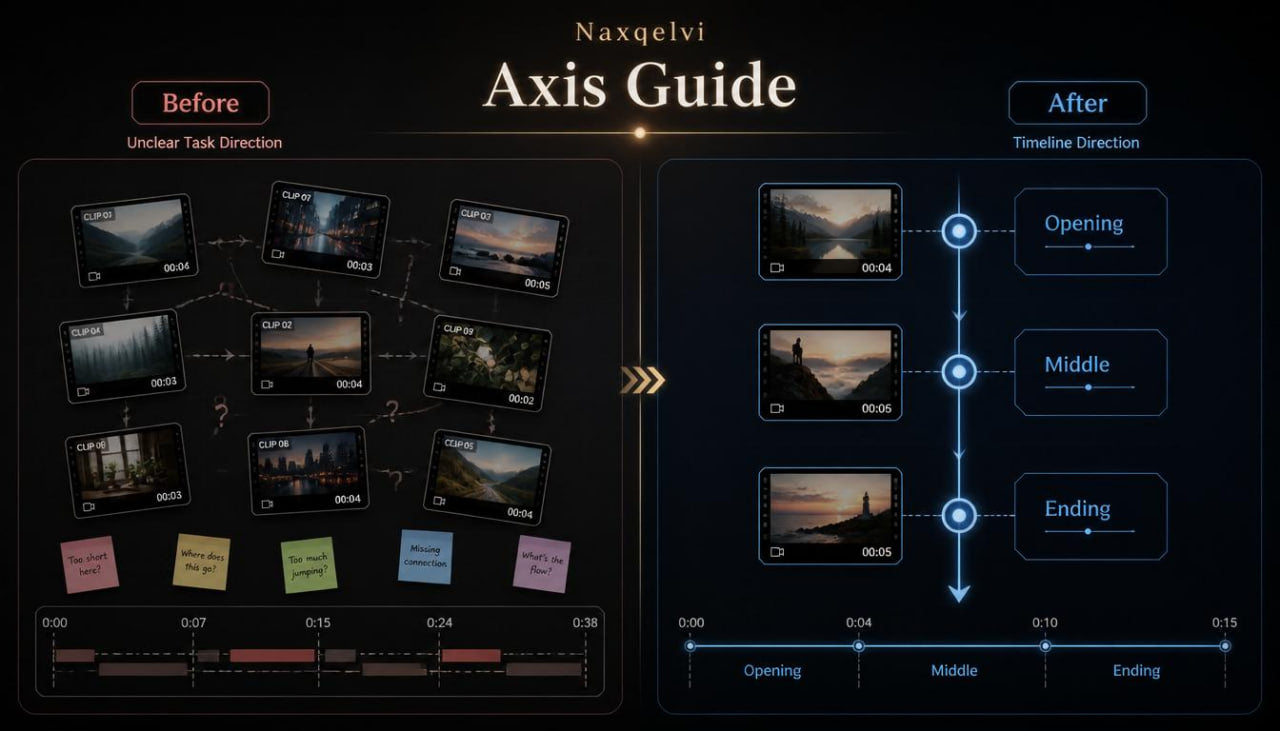
Axis Guide includes a wider set of Naxqelvi materials focused on editing structure and timeline direction. The tier begins with an orientation module that explains how to move from basic editing awareness into more thoughtful sequence planning. Learners are introduced to the idea of an editing axis: a central line of movement, timing, and visual intention that keeps a project organized from beginning to end.
The first main module focuses on timeline direction. It explains how a sequence can move from an opening moment into a middle section and then toward a closing point. Learners study how clip order shapes the viewer’s understanding of a scene, even when the clips themselves are simple. This module includes written examples showing how the same clips can feel different when arranged in another order.
The second module explores pacing layers. Instead of treating pacing as only slow or active, Axis Guide explains pacing as a mix of shot length, visual density, movement, silence, pauses, and scene changes. Learners are guided to notice where a sequence needs space and where it needs a cleaner movement from one moment to the next. This section includes practice prompts where learners compare two timeline outlines and describe how the pacing changes.
The third module introduces visual anchors. A visual anchor is a repeated object, movement, color mood, gesture, or framing choice that helps connect different parts of a project. This section explains how anchors can make a sequence feel more organized. Learners study how repeated visual details can support continuity without needing heavy effects or dramatic transitions.
The fourth module focuses on cut intention. This part helps learners think about why a cut happens at a specific moment. A cut may happen because of movement, emotion, rhythm, change in location, shift in focus, or a planned pause. The materials explain how to choose a cut point with more awareness and how to review whether that cut supports the scene.
Axis Guide also includes a section on transition restraint. Learners study how transitions can be used with purpose, and how too many decorative changes can distract from the structure of a project. The material explains several neutral transition uses: moving between time points, changing location, shifting tone, linking similar movement, or softening a scene change.
A planning sheet is included for short edits. This sheet helps learners outline the goal of a project, note the opening image, choose a central rhythm, list key visual anchors, and mark where the pace should shift. It also includes a small review area where learners can write what felt clear and what may need adjustment.
The tier includes a sequence review checklist with more detail than the Free Kit checklist. It asks learners to review timeline direction, pacing balance, cut placement, transition purpose, visual anchors, and ending clarity. The checklist is designed for repeated use, so learners can return to it while practicing with different short projects.
Axis Guide also contains a mini glossary focused on structure terms. It explains editing axis, visual anchor, pacing layer, cut point, rhythm shift, scene bridge, review pass, and continuity note. These terms are written in simple language so learners can understand them while studying the modules.
The final section is a reflection journal. Learners can record what they noticed while reviewing their sequence, which choices improved the timeline, which parts felt unclear, and what they want to study next. This section encourages calm observation and steady practice rather than outcome-based claims.
- Who Is This For?
Axis Guide is for learners who have already looked at the Free Kit materials or who understand basic editing terms and want more structure. It is suitable for people who want to study how scenes connect, how pacing works, and how timeline choices shape a project. This tier may also fit learners who have tried creating short edits but feel unsure when reviewing their own work.
Axis Guide is not built around dramatic promises. It is intended for learners who want calm, organized materials and a practical way to study editing decisions. The tier is especially useful for those who prefer written modules, planning worksheets, and review prompts.
It can also work well for learners who want a small but more focused tier before moving into wider Naxqelvi materials. The course gives a clear introduction to structured editing habits without overwhelming the learner with too many advanced ideas at once.
- What You’ll Learn
- How to organize a short timeline around a central editing direction
- How to use opening, middle, and closing sections in a simple sequence
- How pacing can be shaped through shot length, pauses, movement, and scene changes
- How to notice visual anchors that connect different clips
- How to choose cut points with clearer intention
- How to compare two timeline versions and describe the difference
- How to use transitions with purpose instead of decoration
- How to plan a short edit before arranging the full sequence
- How to review timeline direction with a practical checklist
- How to write reflection notes after completing a practice sequence
- How to identify moments where a project feels uneven
- How to create a more organized editing study routine
- 30-Day Refund Terms
Axis Guide is covered by a 30-day refund period according to the Naxqelvi store policy. Customers can request a refund within 30 days of purchase if the request follows the stated order conditions and refund rules.
Self-paced learning overview
- 📁 Digital file available after purchase
- 📚 Long-term availability
- 🔒 Secure checkout
- 🗓️ Content updated in 2026
What format are the Naxqelvi course materials provided in?
What format are the Naxqelvi course materials provided in?
Naxqelvi course materials are prepared as digital learning resources for self-paced study. They may include written modules, editing notes, planning tables, recap sections, practice tasks, and project-based examples.
Can I study the materials at my own pace?
Can I study the materials at my own pace?
Yes. The materials are created for gradual study, so learners can read, review, pause, return to earlier topics, and repeat practical tasks when needed.
Do I need previous editing knowledge before starting?
Do I need previous editing knowledge before starting?
No previous editing background is required for the starting tiers. The first materials introduce core ideas such as timeline order, scene rhythm, visual flow, transitions, and basic project organization.
Share